Your Context Window Isn't the Problem. Where You Put Things Inside It Is.
Why bigger context windows make LLMs worse past a point, and the context engineering habits that keep AI agents reliable.
A bigger context window doesn't make your LLM smarter.
Past a point, it makes it worse.
Adding more tokens doesn't add more capability. Models have a real limit to how much they can actually use well, and past it, they start losing track of details and fall back on shallow pattern matching instead of real reasoning, what's usually called context rot. This happens well before you even hit the number printed on the model's spec sheet.
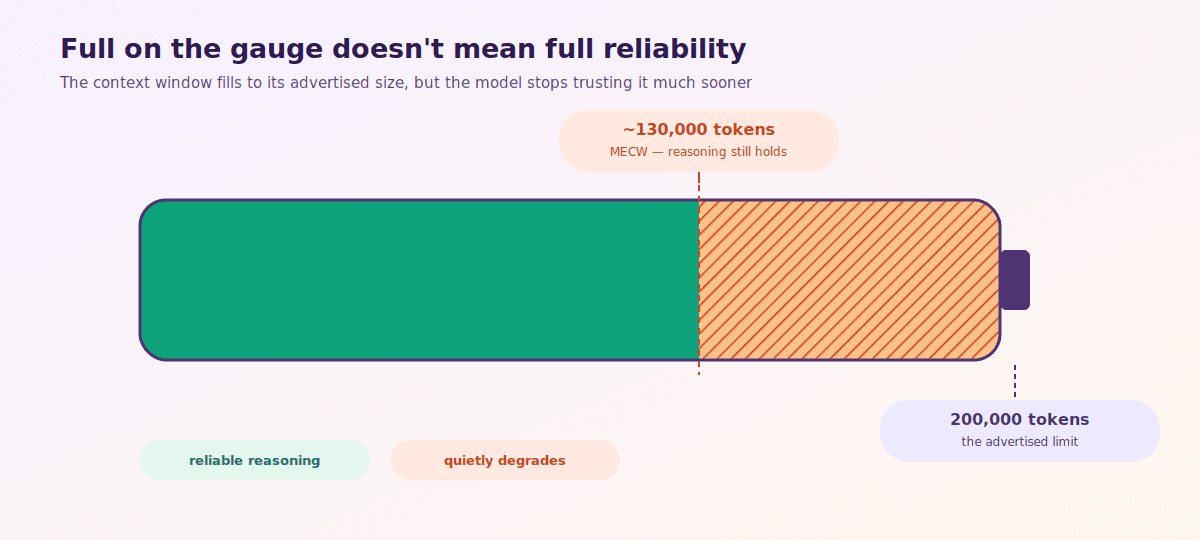
A "200K context" model can start breaking down around 130K tokens. You lose a real chunk of budget without ever realizing it, and most teams don't notice until something in production quietly stops working right.
The real ceiling actually has a name, MECW (Maximum Effective Context Window), the token count where accuracy holds up in practice, usually well below whatever number the spec sheet advertises. Figure 1 shows what that gap actually looks like.
The failure pattern hiding in the middle
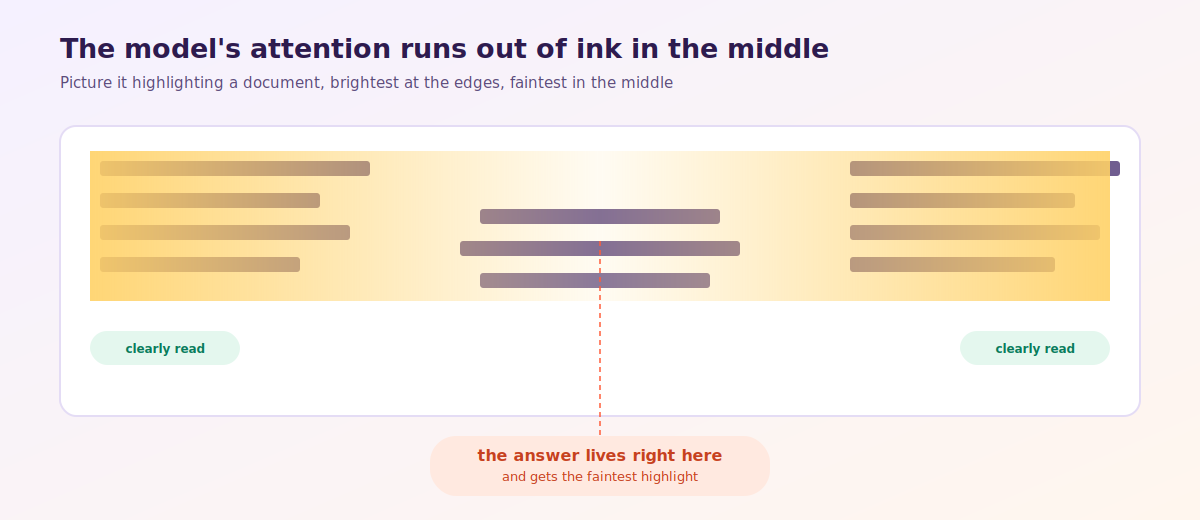
One failure pattern in particular keeps showing up. Information placed in the middle of a long prompt gets ignored more than information at the start or end, the "lost in the middle" problem. Figure 2 shows why, attention runs brightest at the edges of a prompt and fades right in the middle.
Here's what it actually looks like when it happens to a real prompt.
Say you build a support agent for a 300 page product manual. A user asks a specific question, "how do I reset the device to factory settings without losing my saved profiles." Your system pulls in what it thinks is relevant context, the full troubleshooting chapter, a few related FAQ entries, the device's technical specs, and a support ticket from a similar past case. All of that gets stacked into one prompt, in the order it was fetched, specs first, then FAQ, then the actual troubleshooting steps buried in the middle, then the ticket at the end.
The model reads the specs fine. It picks up the ticket at the end fine. But the troubleshooting steps, the actual answer to the question, sitting in the middle of that stack, get skimmed over. The model ends up either giving a generic answer or quoting the wrong section entirely. Nobody wrote a bad prompt here. The information was all technically present. It was just in the wrong position for the model to weight it properly. And retrieval, on its own, never touches that problem.
Why "just retrieve less" isn't the whole answer
The obvious fix is retrieval. Instead of dumping your entire knowledge base into every prompt, you search it first, pull out just the few chunks that relate to the current question, and only feed the model those.
Going back to the same example, instead of stacking the specs, FAQ, troubleshooting chapter, and old ticket together, you'd search the manual and pull out only the 2 or 3 sections that actually answer "reset without losing profiles." It cuts the noise, drops the token count, and keeps the prompt focused.
But it doesn't solve the real problem. It controls how much goes in. It doesn't decide what counts as good context in the first place. Stale info, duplicate chunks, and content dumped in the wrong order can all sneak through a retrieval step that's technically "working." In the support agent example, even a well-retrieved set of 3 chunks can still bury the actual answer in the middle if you don't think about the order you hand them to the model in.
Deciding what actually belongs in the window, and organizing it so the model can use it well, is the harder discipline. It's known as context engineering.
In practice, that means a few concrete habits, starting with how you treat conversation history. Figure 3 compares the two ways teams typically handle it.
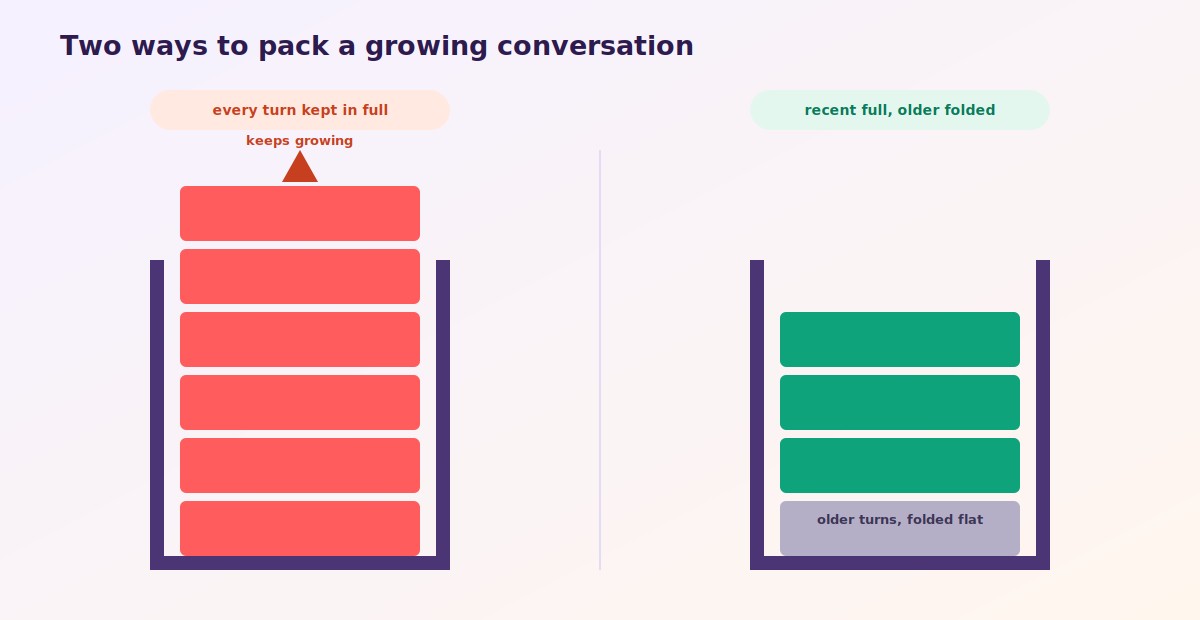
Take a long conversation with an AI agent. Keep every single message in full detail, and you'll blow through your token budget fast, and the model starts losing track of what matters. The fix is to keep the last few exchanges word for word, since that's what the model needs to stay sharp on the current task. Everything older than that gets compressed into a short summary instead of dragged along in full.
The same idea applies to errors. Say your agent calls a tool and the call fails. Most setups clean that up automatically, stripping out the failure and keeping only the final result, which is the wrong move. Erase the failure message and the error details, and the model has no memory that anything went wrong, so on the next attempt, it just tries the exact same broken approach again. Keep the failure in context instead, and the model actually has a chance to learn from it and try something different.
One more place teams lose token budget without noticing is MCP servers, a standard way for AI models to connect to outside tools like your calendar or a database. Each connected server adds its own set of tool definitions to the prompt, and those definitions cost tokens before the user has typed a single word. If you're wired into five or six MCP servers, check how many tokens their tool descriptions alone are eating. It's usually more than people expect.
How to tell if your context strategy is actually working
A broken context strategy rarely shows up as one bad answer. It's more that responses slowly get worse over days or weeks, and nobody can point to the exact day it started. Watching a few specific numbers catches it a lot earlier than waiting for the answers to get bad enough to complain about.
- Token usage per request, over time. If it's creeping upward as conversations get longer, you're probably dragging full history along instead of summarizing it.
- Where the answer-relevant information sits in the prompt. Information consistently buried in the middle of a long context block signals a lost-in-the-middle risk, no matter how good your retrieval was.
- Repeated identical tool calls in a single session, usually a sign the error traces got stripped out, so the model has no memory that the same approach already failed once.
- Schema token cost per connected tool. Check this once per integration, not just once at setup, it only grows as you add more tools.
Building agents well means knowing exactly what the model needs to see to get the job done right on the first try, not how much you can cram into the window.