The Shell Nobody Explains
What "initramfs" means, why you see it, and how to fix it.
You update your kernel. You reboot. Instead of your login screen, you see a black terminal with a prompt like (initramfs). No clear error. No obvious next step.
Here's exactly what that is, why it happens, and how to fix it.
Why this screen exists
When your computer starts, the kernel loads first. But the kernel can't reach your real operating system right away.
Your files might sit on an LVM volume (a flexible way to manage disk storage). They might be encrypted. They might need a specific driver loaded first. The kernel doesn't know how to handle any of that by itself.
So it needs a small helper to prepare things first.
What initramfs actually is
Initramfs is that helper. It's a tiny, temporary system that loads into memory before your real OS does.
Its job is simple:
- Load the drivers your system needs.
- Find your real root filesystem.
- Mount it.
- Hand control over to it.
Once step 4 finishes, initramfs disappears from memory. You never see it. That's the normal case.
You only see the initramfs shell when step 2 or step 3 fails. The helper loads fine. It just can't find or mount your real system. So instead of disappearing, it drops you into a shell and waits.
What this shell is called
It's called BusyBox. BusyBox is a small toolkit built for minimal environments like this one.
The shell inside BusyBox is called ash (short for Almquist shell). You'll usually see this line right above the prompt:
BusyBox v1.xx built-in shell (ash)
People call it "the initramfs shell" or "the BusyBox shell." Both names are correct. One names the environment. The other names the program giving you the prompt.
What causes this
Four common causes:
- A kernel update. The initramfs image wasn't rebuilt to match your new kernel.
- An unclean shutdown. Power loss or a forced reboot can mark your filesystem "dirty." The kernel refuses to mount it until it's checked.
- A wrong root device. Cloning a disk or resizing a partition can break the link between your bootloader and your actual drive.
- A missing driver. Your root filesystem needs LVM, RAID, or encryption support, and the initramfs image doesn't have it.
One more cause, different from the rest: a corrupt ISO or a bad USB write, during installation. This happens before you even have a system installed. Live installers use initramfs too. If your download or USB write was bad, you'll see this same shell, but the error will mention squashfs, not a missing root device.
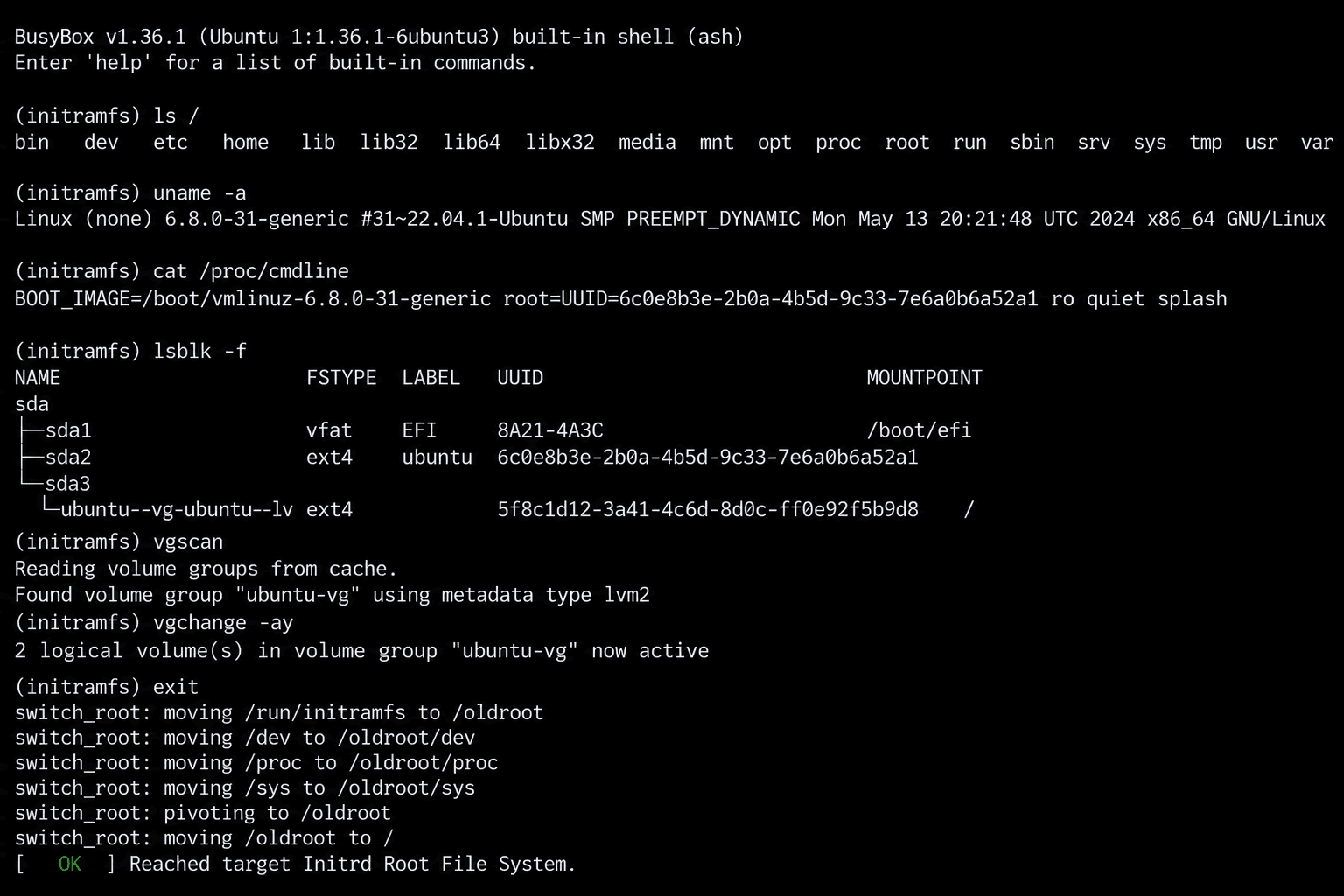
Here's what that shell actually looks like in practice. This is a real (initramfs) prompt, working through the diagnosis by hand: checking the disk layout, finding the LVM volume group, activating it, and finally handing off to the real system.
The fix, on an existing system
- Boot from a live USB of your distro.
- Mount your real root filesystem.
chrootinto it. This makes your commands run against your real system.- Rebuild the initramfs image.
- Reboot.
# Debian / Ubuntu
update-initramfs -u

# Fedora / RHEL
dracut -f

# Arch
mkinitcpio -P
No reinstall. No lost data, in almost every case.
The fix, during installation
The steps above don't apply here. There's no system to chroot into yet.
Instead:
- Re-download the ISO.
- Check its checksum against the one the distro publishes.
- Rewrite the USB using a proper tool, not drag-and-drop.
Where squashfs fits in
Squashfs is a compressed, read-only filesystem. You'll find it inside initramfs images, live USBs, and many embedded Linux systems. It's small and fast to load.
Read-only means exactly that. You can't edit a file inside it and save. Nothing will stick.
To actually change something inside a squashfs image:
# 1. Unpack
unsquashfs image.squashfs

# 2. Edit the files

# 3. Repack
mksquashfs edited-directory/ new-image.squashfs
Why this is worth knowing
You'll rarely see initramfs or squashfs directly. Most of the time, they do their job silently.
But when they fail, usually right after an update, it helps to know what you're looking at. The fix is small. The confusing part was never the problem itself. It was not knowing what "initramfs" meant.